Upgrade PST Format
Upgrade PST Format for Ease of Data Manageability and Accessibility
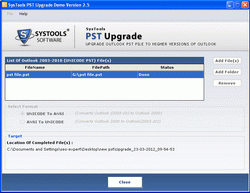
Just Apply simple yet powerful PST Conversion tool to upgrade several PST from Ansi PST to Unicode PST and Vice versa. Software efficiently performs:
- Conversion of Ansi PST (MS Outlook Outlook 2000/2002/XP) to Unicode PST (MS Outlook 2003/2007)
- Conversion of Unicode PST (MS Outlook 2003/2007) to Ansi PST (MS Outlook 2000/2002/XP)
Microsoft Outlook: The Perfect Communication Management System
Businesses worldwide of any size from large scale enterprises to small and mid-size companies, invest hugely to strengthen their 'Communication System'. To communicate effectively and efficiently and smooth both inwards and outwards communication, organizations deploy email applications software. Microsoft Outlook or Microsoft Office Outlook as known earlier is the most preferred choice as an 'email client' amongst the organizations. Due to its friendlier user interface and its coupling with the other Microsoft Office family members is what makes it so popular amongst its users.
Microsoft Outlook: More than just an “emailing “application…..
Many users treat Outlook just as application software for emailing and are unaware of its other functionalities. Outlook is not just an emailing application but a complete multi-faceted application with a contacts manager, task manager, scheduler and calendar, a journal and a notes taker.
File Extension used by Outlook
Microsoft Outlook uses the Personal Storage Table (.pst) open file format for storing all its data contents like mail messages, calendar items, contacts list, to-do-lists, appointments and notes. All Outlook versions released till date even the newest Outlook 2010 version all use the same file format. Simply upgrade PST format into Outlook 2007/2003 with Office PST Upgrade tool.
Microsoft Outlook Versions. Which versions support the ANSI or Unicode encoding standards?
The first official version of Outlook was released in January’97 along with the equivalent Microsoft Office Suite. With technical advancements over the time, every Outlook version released had more feature enhancements overcoming the previous shortcomings.
The Outlook versions i.e. Version 97, 98, 2000 (XP) and 2002 supported the ANSI encoding for their PST files. The Outlook versions released after 2002 i.e. Versions 2003, 2007 and 2010 supported the Unicode encoding format.

Convert Outlook ANSI PST