Transfer Outlook Mail Folder to New Computer
Transfer Outlook Mail Folder to New Computer Machine in Unicode File Format
- Have you purchased new computer machines in your office as the previous machines are not doing up to the mark? Thus to transfer Outlook mail folder to new computer are you in need of some external data converter application?
- Do you have some of the important data stored in ANSI PST files but data sharing is necessity with friends with PST files in Unicode PST files in versions like 2003, 2007, and 2010 (32-bit)?
Use External Apparatus to Transfer Outlook Mail Folder to New Computer Machine
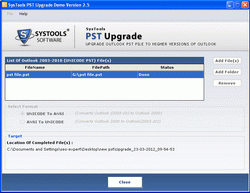
The need to transfer Outlook mail folder to new computer can be done with supplementary solution like PST Upgrade software. This tool is to move entire PST data from old file format to the new one (ANSI to Unicode) and from new format to old one (Unicode to ANSI)
- The tool is not only to transfer Outlook mail folder to new computer with Unicode file format, it is apt for converting data like contacts, journals, to do list, etc to Unicode file format.
- Software will keep you updated for duration of long two years with the purchase of Business License and Enterprise License. If Personal License is purchased, software will keep you updated for a period of one long year.
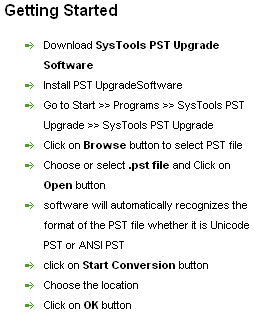
- The simple steps of software to transfer Outlook mail folder to new computer is apt for neophyte and fully skilled in computer users.
- FREE software exhibit will show you all the features and will convert 15 mails from ANSI to Unicode file format
- To transfer Outlook mail to new Outlook machine completely use full retail version of this application
- The User Interface of this data converter application is stunning to use
- It converts journals, notes, metadata information (To, CC, Bcc, From, sent date and receive data), calendars, to do list etc without harming of any data.

Screenshot